The private AI workspace for people who do deals.

Record your meetings, draft and review the contracts, and keep every person, term, and deal connected — all on your Mac, never on our servers. One-time $49, bring your own AI.

Download for Mac
macOS (Apple Silicon) · No account required
On-device database Local transcription Your own AI key Works fully offline
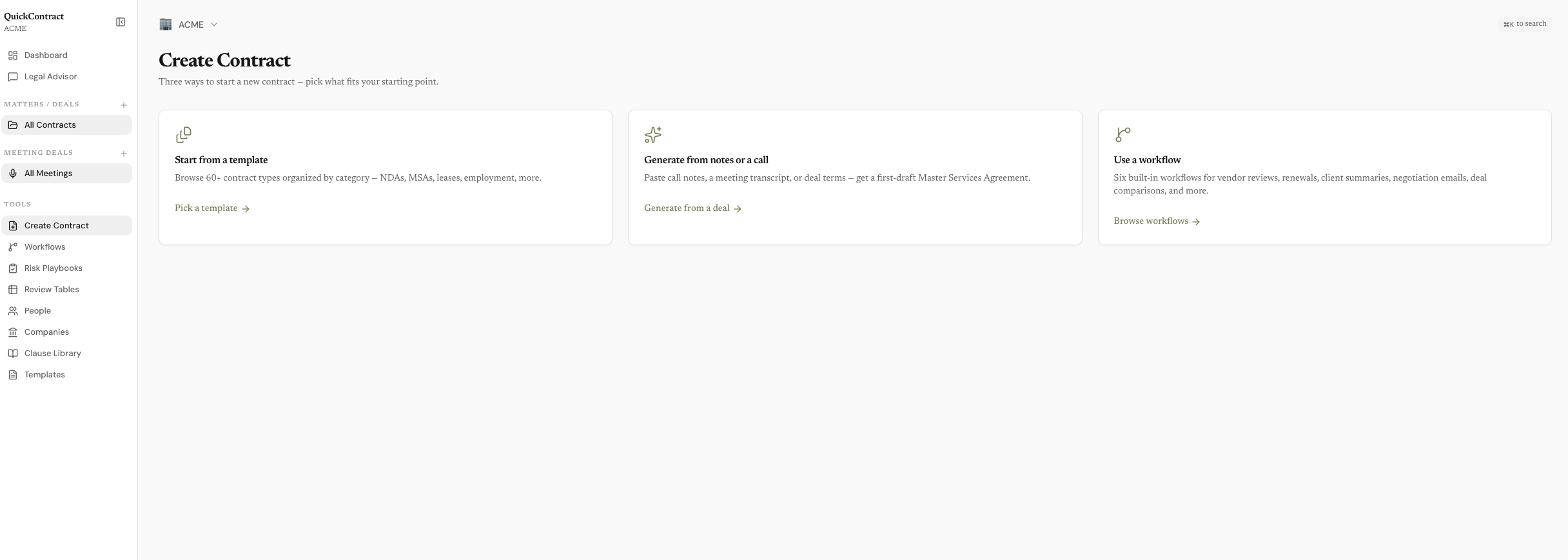
QuickContract — Create Contract
QuickContract Create Contract screen — start from a template, generate a draft from notes or a call, or run a workflow, with the full sidebar of tools on the left.

Meetings, people, contracts, and matters — one connected record, all on your Mac.

Teach it the job once.

Turn your standard motions — a sales call into an MSA, a vendor agreement into a risk report — into reusable workflows with their own inputs, sources, model, and house rules. Six ship built in. Press Run.
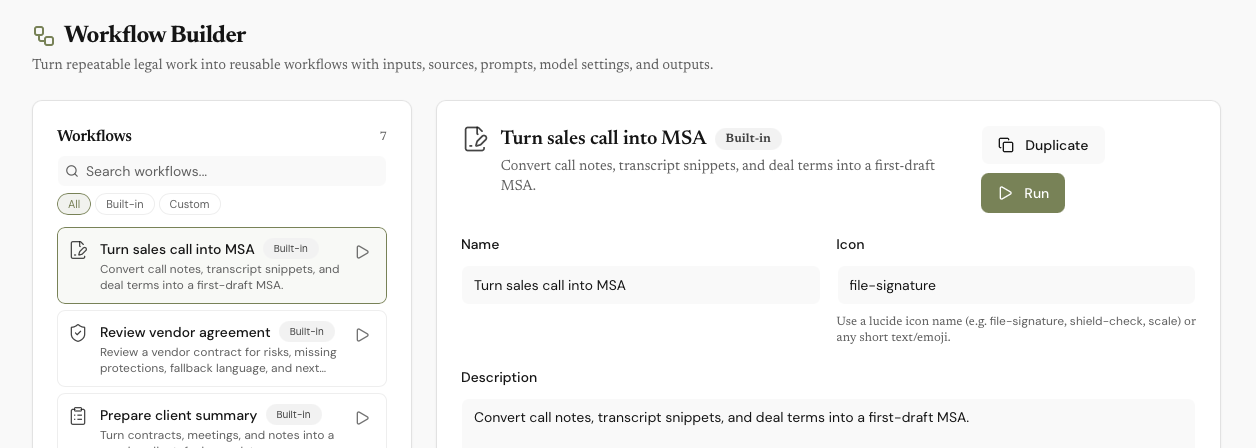
QuickContract — Workflows
QuickContract Workflow Builder with the built-in ‘Turn sales call into MSA’ workflow open — inputs, sources, model override, jurisdiction notes, and output rules all configured.

For anyone always in meetings, drafting documents, doing deals

Freelancers Startups Agencies Consultants Sales teams Legal Property Small firms

How it works

Your call becomes the first draft — automatically.

Record your meeting — QuickContract transcribes it locally

Client call: Meridian
100 employees, growing
use tuesday.ai, too manual
budget 50-75 per employee
want to implement Q2
need slack + notion integration

When the meeting ends, QuickContract extracts terms and action items

Client call: Meridian
Deal Terms
Budget: $50-75/employee/year
Timeline: Q2 2026 implementation
Requirements: Slack + Notion integration
Action Items
☐ Send proposal by Friday
☐ Schedule demo for their team
☐ Get security compliance docs
Draft Contract Follow-up Email

One meeting. Everything that follows.

Tell QuickContract what you need — it drafts, reviews, summarizes, and follows up

Draft a contract from the call
Write a follow-up email
List action items
What's their budget?
Generate an NDA
Summarize for the team
Review their counter-proposal
Compare both offers
Check this clause for risks
Debrief all calls with Atlas
What did Sarah say about IP?
Which contracts expire this quarter?
Draft a contract from the call
Write a follow-up email
List action items
What's their budget?
Generate an NDA
Summarize for the team
Review their counter-proposal
Compare both offers
Check this clause for risks
Debrief all calls with Atlas
What did Sarah say about IP?
Which contracts expire this quarter?

One meeting builds the whole record

Everything in QuickContract is connected. Record a call, and the attendees become people in your directory — each linked to their company. The terms discussed become a draft contract — linked back to the meeting it came from.

That's why you can ask questions no notetaker can answer. "What did Sarah say about IP?" finds the meeting, because Sarah is linked to it. "Which contracts came out of my calls with Meridian?" walks company → people → meetings → contracts.

Answers come with citations to the exact meeting or clause — and the entire graph lives in one local database on your Mac. Nothing to sync, nothing to upload.

💬
Assistant
What was the fee structure discussed with David?
In your March 30 meeting with David, a success fee arrangement was discussed but the exact percentage wasn't finalized. He mentioned 2-3% for mining deals. You agreed to clarify the structure before proceeding.

Keep track of every person and company you deal with

Everyone you meet and every company you deal with — automatically organized from your meetings. No data entry.

Open David's page and see everything linked to him: every meeting he attended, every contract he's a party to, every term he discussed, every action item still open. One click generates a full relationship debrief before your next call.

People
HDavid Chen · Investor
3 meetings · 1 contract
JAlex Rivera · Meridian
5 meetings · 2 contracts
SMaya Thompson · Atlas
2 meetings · 1 contract

Review, negotiate, and compare any agreement

Upload a contract you received. Get a clause-by-clause risk report. Generate counter-proposals for every unfavorable term.

Compare two versions side by side. Merge the best clauses. Highlight anything for a plain-English explanation.

Contract Review
Score: B+ 3 risks found
Payment terms — Net 30
IP clause — Overly broad assignment
Confidentiality — Standard mutual
Termination — No cure period

Everything the deal needs, in one app.

📄

60+ contract types

NDAs, freelance agreements, employment contracts, leases, SAFEs, consulting agreements, and more. Personalized to your business.

Risk Playbooks

Codify your review rules. Run them on any contract. Get findings with severity, suggested fixes, and citations back to the exact clause.

Workflows

Sales call → MSA. Vendor agreement → risk report. Six built-in multi-step workflows. Duplicate any of them to make your own.

📊

Review Tables

Bulk-extract terms across many contracts. Pick a preset, select sources, run. Every cell has answer, citation, and confidence.

📁

Folders & overview

Group contracts and meetings into folders. Each folder's Overview links its documents, people, and open risks into a single timeline.

🎙

Local meeting recording

Record any call. Transcription happens locally — your audio never leaves your device. No bot joins your meeting.

💬

Assistant with context

Pin a contract or meeting and the assistant treats it as the source of truth. Suggested next actions after every response.

📋

Clause library & templates

Save your strongest clauses. Generate AI variants. Reuse across every contract. Build a library that compounds over time.

Every feature, in detail

Contract Generation

60+ types: NDA, MSA, SOW, Employment, SAFE, Lease, Consulting, Advisory, IP Assignment, Subcontractor, and more. Describe a deal in plain language or fill a form. AI generates a complete, jurisdiction-aware contract.

QuickEdit

Highlight any text in any contract — generated or uploaded. Six AI actions: Explain, Rewrite, Risk-check, Improve, Add clause, Save to library. Every edit preserves formatting.

Assistant

AI chat with full context on your meetings, contracts, people, and companies. Ask anything — "What did David say about fees?" or "Which contracts expire this quarter?" Get sourced answers instantly.

Workflows

Six built-in multi-step workflows: Sales Call to MSA, Vendor Agreement Review, Client Summary, Renewal Obligations, Negotiation Email, and Deal Comparison. Duplicate and customize any workflow for your team.

Meeting Intelligence

Whisper transcription — local by default, or use OpenAI/Deepgram for cloud accuracy. Auto-detect calls on Zoom, Meet, and Teams. Calendar integration. AI extracts terms, action items, and participants automatically.

People & Companies

Auto-populated from your meetings. Full relationship timeline per person. Meeting history, contract history, terms discussed, action items. Generate a debrief in one click.

Clause Library

Save clauses from any contract. AI-generate variants. Tag and organize. Reuse your strongest language across every contract you create.

Templates

Save entire contracts as reusable templates. Pre-fill with your business defaults — jurisdiction, payment terms, IP stance. One-click generation from any template.

Contract Comparison

Side-by-side diff of two contracts. Clause-level matching highlights what changed. Merge the best terms from each version into a final agreement.

Your clients' secrets aren't our business — literally

Every other AI notetaker and contract tool runs on someone else's cloud. QuickContract doesn't. Your recordings, transcripts, contracts, and chat history live in a local database on your Mac — we have no server that stores them, no copy to leak, and nothing to hand over.

Audio is transcribed locally using Whisper — it never leaves your device. AI runs through the key you provide, straight from your Mac to the provider you trust — or fully air-gapped with Ollama. And because you buy QuickContract once instead of renting it, there's no business model that needs your data. If your work is under NDA, this is the architecture that keeps you compliant by default.

Local database
Local transcription
No audio uploaded
Your own AI key
Fully offline mode
No telemetry

Plays well with your stack — without a middleman

Every connection is optional, and every one is direct: your Mac talks straight to Google, Slack, or HubSpot using your own login. Nothing routes through our servers, ever.

Gmail & Outlook

Email a contract, send follow-ups, or link related correspondence — signed in with your own account.

Google Drive

Import documents in, save contracts out, or auto-back up your whole contract folder to Drive.

Notion

Push meeting summaries and contracts to your Notion workspace — automatically, if you want.

Slack

Share contract and meeting summaries to a channel, or auto-post after every meeting.

HubSpot

Two-way contact and company sync. Create deals from contracts and keep stages up to date.

Google Calendar

Upcoming meetings, titles, and attendees auto-populate — walk into every call prepared.

Works with Claude

QuickContract ships an MCP server, so Claude Desktop and Claude Code can query your contracts, meetings, and deals — right from your machine. Your AI assistant gets your deal history without your deal history going anywhere.

A little setup up front. Very worth it after.

There's one real step — connecting your own AI, about a minute. After that it just works, quietly, on every call and contract.

1

Download the app

~30 seconds. A normal Mac app — free, no account. On your first recording, macOS asks once for microphone and system-audio access — two Allows and every call after is captured.

2

Connect your AI

~1 minute. Create an OpenRouter key and paste it in, or install Ollama to run completely free and offline. This is the only setup that takes any thought.

3

That's the whole setup

Forever after. No subscription to manage, no config to maintain, no lock-in. You own it — most people spend about $5/month on AI, or nothing with Ollama.

A few minutes once, and then QuickContract does the work on every meeting and deal that follows — no ongoing effort, no monthly bill.

Simple pricing

Start free. Unlock AI when you're ready.

Free

$0

Free forever. No account required.
  • Meeting recording (unlimited)
  • Raw transcripts with timestamps
  • Upload contracts (PDF/DOCX/TXT)
  • Contract viewer & editor
  • Dashboard & organization
  • People & company directory
Download for Mac
Pro License Launch Sale

$99$49

One-time purchase. Yours forever.
  • Everything free, plus:
  • Contract generation (60+ types)
  • QuickEdit (6 AI actions)
  • Assistant chat
  • 6 built-in workflows
  • Meeting AI enhancement
  • Clause library AI features
  • Contract comparison
Download to buy →

Free to download. Buy the license from inside the app after sign-up.

Firm Bundles

Multi-seat? Talk to us.

One-time bundle pricing for small and mid-sized firms. 2 to 50+ seats. No subscription, no per-month fees.
  • One-time purchase
  • Volume pricing per seat
  • License delivered as a file
  • Each seat is a full standalone install
Email support@quickcontract.ai

No AI subscription. No per-contract fees. Ever. You connect your own AI provider — we recommend OpenRouter (takes 30 seconds). Your key, your provider, your choice of model — your documents go directly to them, never through us. Most users spend about $5/month, or run Ollama locally and never pay a cent.

QuickContract vs doing it yourself

Add up what you're paying now. Then compare.

Task QuickContract The old way
Contract drafting60+ types, AI-generatedLawyer ($300–500/hr) or Google Docs
Contract reviewAI clause-by-clause analysisLawyer review ($500+/contract)
Meeting recordingLocal, private, unlimitedOtter/Granola ($18/mo = $216/yr)
Legal Q&AAI advisor with full contextLawyer on retainer ($2,000+/yr)
Contacts & CRMAuto-organized from meetingsSpreadsheet or HubSpot ($0–50/mo)
Clause librarySave, generate, reuseFolder of old contracts
Year-one cost$49 once + ~$5/mo AI$1,500+ easily

What $49 gets you

One payment. Yours forever. No subscription.

📄

60+ contract types

NDAs, MSAs, SOWs, SAFEs, leases, employment agreements, and more. Generated in seconds, personalized to your business.

6 AI editing tools

Highlight any clause — explain, rewrite, risk-check, improve, add, or save to your library.

🤖

6 built-in workflows

Sales Call to MSA, Vendor Agreement Review, Client Summary, Renewal Obligations, Negotiation Email, and Deal Comparison. Duplicate any of them to make your own.

🎤

Unlimited meeting recording

Record any call. Transcription runs locally — your audio never leaves your device. No bot joins your meeting.

🔒

Fully private and offline

All your data is stored on your machine — never on our servers. Go fully air-gapped with Ollama: no internet, no cloud, nothing to hand over to us.

Frequently asked questions

Is QuickContract really free?
Yes. Meeting recording, transcription, contract uploading/viewing, the dashboard, and people/company directory are all free forever. No account needed. AI features — contract generation, editing, chat, workflows — require a $49 Pro License.
What does AI cost?
QuickContract has no AI usage fees, no metered pricing, and no per-contract charges. You connect an AI provider like OpenRouter and pay them directly — about $5 gets you started and lasts most users weeks. You can also go fully offline and free with Ollama.
Do you have firm or multi-seat pricing?
Yes. Bundle licenses are available for firms of any size — solos all the way up to 50+ seats. Email support@quickcontract.ai for a quote. Bundles are one-time purchases; no subscriptions, no per-seat monthly fees.
Can I use it without buying a license?
Yes. Record meetings, upload and view contracts, organize people and companies — all free. When you're ready for AI features, the Pro License is a one-time $49 purchase.
Can I use it offline?
Yes. Meeting transcription always runs locally. With Ollama installed, all AI features work completely offline too — no internet required.
How many devices can I use?
A Pro License activates on up to 3 machines. You can deactivate a device from Settings to free up a slot.
What happens to my meeting recordings?
Your audio is transcribed locally using Whisper and stored on your device. Nothing is uploaded. You can delete recordings at any time.
Can you see my contracts or meetings?
No — architecturally, we can't. Everything lives in a local database on your Mac; our servers only handle license verification. When you use AI features, text goes directly from your device to the provider you chose, under your own API key. Full details in our privacy policy.
Is this a real legal tool?
QuickContract is an AI-powered productivity tool — not a law firm. It helps you draft, review, and manage contracts faster, but you should always have important agreements reviewed by a qualified attorney.

Built by an independent team

QuickContract is built by a small, independent team that believes legal tools shouldn't cost $500/month. We ship updates every week, read every support email, and build what our users actually ask for.

No venture capital. No enterprise sales team. Just a focused product that does the job.

— The QuickContract team

$49 vs your next
$500 lawyer invoice

Record meetings for free. Draft and review contracts for a one-time $49.

Download for Mac See what's included